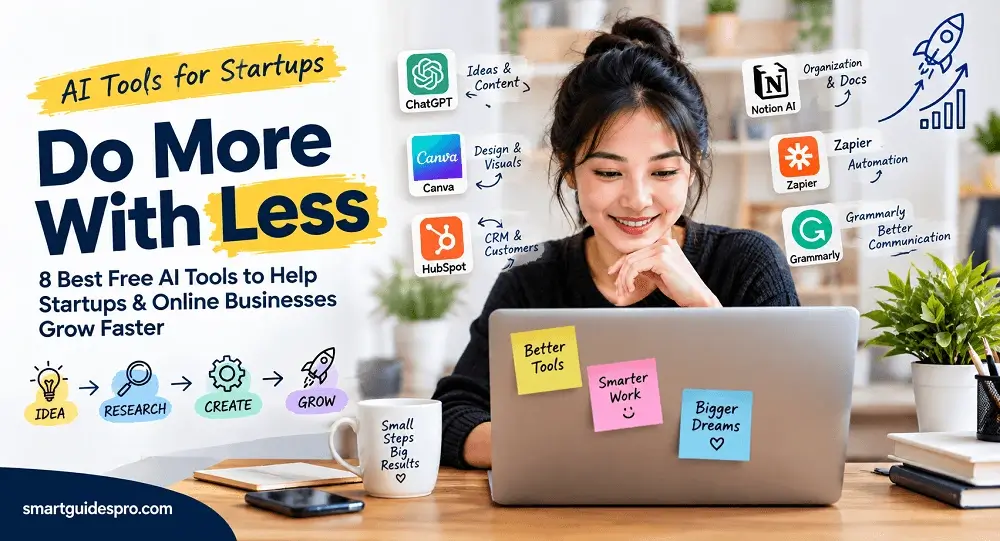
8 Best Free AI Tools for Startups and Online Businesses to Work Smarter

Discover the 8 best free AI tools for startups and online businesses. Learn how these practical AI solutions can help with content, design, productivity, customer management, and automation—without adding unnecessary costs.
Introduction: Why Startups Are Turning to AI to Do More With Less
Starting a business sounds exciting until you realize how many jobs can land on one person’s desk. A startup founder might spend the morning working on marketing, switch to writing website content before lunch, answer customer questions in the afternoon, and still have research, planning, and administrative work waiting at the end of the day.
That is especially common when a business has a limited budget, a small team, and very little time. In the early stages, hiring someone for every task simply isn’t realistic. Founders and small teams often have to wear several hats at once, even when they don’t have expertise in every area.
This is where AI tools for startups can become useful.
AI can help with certain time-consuming tasks, from generating ideas and assisting with content to supporting communication and organizing information. Used thoughtfully, these tools can give a small team extra capacity without requiring a large technology budget.
But there is an important distinction: using more AI does not automatically mean getting more done.
In my opinion, the real value comes from using AI where it solves a genuine business problem. A founder doesn’t need dozens of subscriptions or a different AI tool for every small task. In many cases, a few well-chosen tools can be more useful than a crowded collection of apps that nobody uses consistently.
That is why this guide focuses on free and freemium AI tools for startups and online businesses. These options can be particularly useful for entrepreneurs, solo founders, small teams, and people building an online business who want to explore AI without immediately committing to expensive software.
Throughout this guide, we’ll look at tools based on real business needs rather than popularity alone. Some can help with content and marketing, while others are useful for productivity, customer management, organization, or repetitive tasks.
If you’re launching a new business, running a small online operation, or simply trying to accomplish more with limited resources, the goal isn’t to use AI everywhere. It’s to find practical ways to make your existing work easier, faster, or more manageable.
And sometimes, knowing where not to use AI can be just as valuable as knowing where to use it.
Related reading: Top 10 Best AI Tools for Content Creation and Marketing for Small Businesses
For another practical look at AI-powered business productivity, see Top 17 Best AI Tools for Small Businesses and Beginners.
Why AI Tools Can Make a Real Difference for Small Businesses and Startups
For a small business, productivity is not just about getting more work done. It is about deciding which work deserves your limited time in the first place. When the same person is handling marketing, customer questions, research, and daily operations, even small time savings can add up quickly.
That is one reason free AI tools for startups have become useful for founders who need practical help without immediately adding more software costs to the business.
1. Reduce Repetitive Work
Some business tasks are necessary but don’t require much original thinking. Writing routine responses, summarizing information, reformatting text, or turning notes into a clearer format can consume surprising amounts of time.
AI can assist with these repetitive jobs so founders can spend less time starting from a blank page.
For example, a solo founder could use AI to turn rough notes into a draft email or summarize a long document before reviewing the important points themselves.
2. Speed Up Content Creation
Content is often important for an online business, but creating it consistently can be difficult when there is no dedicated marketing team.
AI can help generate starting points for blog ideas, social media concepts, product descriptions, email drafts, and other content. The important part is that the founder still reviews and improves the output.
In my opinion, AI works best here as a starting point rather than a replacement for human judgment.
3. Improve Business Communication
Clear communication matters whether you’re responding to a customer, writing a proposal, contacting a potential partner, or explaining an idea to your team.
AI can help make rough writing clearer, adjust the tone, summarize lengthy messages, or suggest ways to communicate an idea more effectively.
That can be particularly helpful for founders who handle most of their business communication themselves.
4. Organize Information
As a business grows, information starts appearing everywhere—meeting notes, customer questions, ideas, research, documents, and project updates.
AI can help summarize, structure, and organize that information, making it easier to turn scattered notes into something useful.
5. Support Customer and Lead Management
Small businesses often cannot afford to have someone monitoring every customer interaction. AI can assist with drafting responses, summarizing conversations, organizing lead information, and identifying routine follow-up tasks.
It does not remove the need for human interaction, but it can make the administrative side less time-consuming.
6. Automate Simple Workflows
Another advantage of AI tools for online businesses is their ability to support simple repetitive processes.
A business might automatically send a notification after a form submission, create a task when a new lead arrives, or move information between connected applications.
The goal isn’t to automate everything. Simple automation is most useful when it removes a predictable task that someone would otherwise have to repeat manually.
7. Give Founders More Time for Higher-Value Work
Ultimately, the biggest benefit may not be the individual minutes saved on each task. It is what the founder can do with that time afterward.
Instead of repeatedly formatting information or drafting routine messages, they may have more time for customer conversations, product improvements, strategic planning, sales, or understanding their market.
One thing I’ve noticed is that productivity gains often come from removing friction from many small tasks, rather than expecting AI to handle an entire business.
That is also why free AI tools for small businesses and AI productivity tools for startups can be valuable even when a company has only a few employees. The goal is not to replace the people doing the work. It is to help those people use their limited time more effectively.
Related articles you may find helpful:
- We Tested 5 of the Best AI Sales and CRM Tools for Small Businesses
- Top 8 Best AI Tools for Productivity and Task Management for Small Businesses
- Top 7 Best AI Tools for Business Automation and Workflow Management
8 Best Free AI Tools for Startups and Online Businesses
Choosing an AI tool is easier when you start with the job you need to get done. A startup founder who needs help turning ideas into content has a different problem from someone trying to organize customer leads or automate repetitive tasks.
That is why this list isn’t simply based on which AI platforms are the most talked about. We’ve grouped these best AI tools for startups around practical business needs, including writing, visual content, organization, automation, customer management, and everyday productivity.
The tools below also have a free plan, free access, or a free tier worth exploring. Keep in mind that free plans can have usage limits, and companies may change their pricing or feature availability over time.
1. ChatGPT — Best for General-Purpose AI Assistance
ChatGPT is probably the most flexible starting point for a founder who wants one general-purpose AI assistant rather than a specialized tool for every task.
Its usefulness comes from the range of work it can support. A founder can use it to brainstorm business ideas, organize thoughts, create content outlines, summarize information, research a topic, draft an email, or turn rough notes into something more structured.
For example, imagine you’re launching a small online service and have an idea for a blog post but aren’t sure how to structure it. You could give ChatGPT the rough idea, describe your target customer, and ask for an outline. You can then review the suggestions and shape the final version around your own expertise.
It can also help with customer-response drafts. Instead of starting from a blank screen, you might provide the customer’s question and your intended answer, then ask AI to make the response clearer and more professional.
Free Plan / Free Access: ChatGPT has a free tier with access to chat and several capabilities, although usage limits apply and can change over time. OpenAI currently lists web browsing, file and image uploads, data analysis, image generation, and access to existing GPTs among the capabilities available to free users, subject to limits.
Pros
- Useful for many different business tasks
- Easy for beginners to start with
- Helpful for brainstorming and drafting
- Can work from instructions and business context
Cons
- Output still needs human review
- Usage limits apply on the free tier
- It should not be treated as an unquestioned source of facts
Who It’s Best For:
Solo founders, entrepreneurs, and small teams that want a flexible AI assistant for everyday thinking, writing, research, and planning.
2. Canva — Best for Quick Marketing and Visual Content
Canva is particularly useful when a startup needs professional-looking visual content but doesn’t have a dedicated designer.
For a small business, that might mean social media graphics, presentations, promotional materials, simple advertisements, or other visual assets needed for day-to-day marketing.
The advantage for beginners is that you don’t have to start with advanced design software. You can work from templates and modify the content for your business. Canva also includes AI-powered features, although access depends on the plan and the particular AI feature being used.
A realistic example would be a founder preparing to promote a new service on social media. Instead of hiring a designer for every simple announcement, the founder could create a basic branded graphic, adjust the text and imagery, and prepare it for publication.
Canva’s current free AI access is subject to an AI allowance. Canva says its Free plan can use Standard and Premium AI tools within a monthly allowance, while more advanced Ultra AI features are not available on the Free plan.
Pros
- Beginner-friendly visual editor
- Useful for social media and marketing materials
- Large selection of templates and design assets
- Combines traditional design features with AI tools
Cons
- Some advanced features require a paid plan
- AI usage on the Free plan is limited
- Templates can look less distinctive if they are used without customization
Who It’s Best For:
Startups, entrepreneurs, and small online businesses that need to create marketing visuals quickly without having a full-time designer.
3. Notion AI — Best for Organizing Business Knowledge and Tasks
Notion takes a different approach. Instead of being primarily a chatbot or design platform, it can become a central place for a startup’s notes, documents, projects, tasks, and internal knowledge.
This makes it interesting for founders who have information scattered across notebooks, documents, messages, and different project files.
Think of Notion as a kind of business memory. A founder could keep meeting notes, content ideas, project information, simple standard operating procedures, and other internal documentation in one workspace.
For example, after a team meeting, notes can be organized into action items and stored alongside the relevant project. Over time, that creates a more useful record of how the business operates.
Notion’s Free plan currently includes a limited opportunity to try Notion AI. The company says everyone can try AI features for free, but after the complimentary AI responses are used, continued AI access requires an upgrade to a Business or Enterprise plan.
That distinction matters: Notion itself has a Free plan, but Notion AI is not unlimited on that plan.
Pros
- Combines notes, documents, databases, and tasks
- Useful for organizing internal business information
- Can help turn scattered information into structured content
- Particularly useful as a business grows
Cons
- Free AI access is limited
- Can take time to build a useful workspace
- May be more than a solo founder needs for very simple projects
Who It’s Best For:
Founders and small teams that need one organized place for business knowledge, documentation, projects, and tasks.
4. Zapier — Best for Connecting Apps and Automating Repetitive Work
Zapier is different from the other tools on this list because its main value is connecting applications and helping businesses automate repetitive processes.
The basic concept is simple: when something happens in one application, Zapier can trigger an action somewhere else.
For example:
Form submission → Spreadsheet → Email → Task
A new lead could trigger a notification, add information to a table, and create a follow-up task without someone manually copying the same information between applications.
This can be especially useful for startups because repetitive administrative work tends to increase as the business grows.
The Free plan currently includes unlimited Zap workflows, Tables, and Forms, but limits usage to 100 tasks per month and supports two-step Zaps. Zapier also notes that Free users have a 15-minute polling interval for applicable polling triggers.
So while the free tier can be useful for experimenting with automation, a business with higher workflow volume or more complex multi-step processes may eventually need a paid plan.
Pros
- Connects many different business applications
- Useful for repetitive tasks
- No-code approach makes automation accessible
- Can grow with a business
Cons
- Free usage is limited
- More advanced workflows require paid features
- Automation needs careful testing before being trusted with important tasks
Who It’s Best For:
Startups and online businesses that repeatedly move information between different apps or perform predictable administrative tasks.
5. HubSpot — Best for CRM and Customer Management
HubSpot is worth considering when a startup’s challenge shifts from simply getting work done to keeping track of customers, prospects, and sales opportunities.
Its Smart CRM provides a place to manage contacts, companies, deals, and pipelines. That can be useful even for a small business because customer information becomes harder to manage once you have more conversations and leads coming in.
Imagine a founder who starts with a simple spreadsheet of potential customers. As the number of leads increases, it becomes easier to lose track of who was contacted, what was discussed, and what needs to happen next. A CRM provides a more structured way to manage that information.
HubSpot currently offers a free Smart CRM with contact, company, and deal management, along with pipeline organization and data synchronization.
However, it is important to separate the free CRM from HubSpot’s broader collection of paid products and advanced AI capabilities. Some AI-powered functionality and advanced features are tied to higher-tier products or usage-based credits.
Pros
- Useful free CRM foundation
- Organizes leads and customer information
- Helps businesses manage sales pipelines
- Can grow into a broader business platform
Cons
- Advanced features can become complex
- Many additional capabilities are paid
- May be unnecessary for a business with very few customers or leads
Who It’s Best For:
Startups, service businesses, and online companies that are beginning to manage multiple leads, prospects, or customer relationships.
6. Grammarly — Best for Business Writing and Communication
Grammarly is especially useful for founders who spend a lot of time communicating through email, proposals, website copy, social posts, and other written channels.
Clear writing can affect how a business is perceived. A rushed customer email or confusing proposal may create unnecessary friction, particularly for a new company that is still building trust.
Grammarly can help identify writing issues, provide feedback on tone, and assist with generating or improving text. Its AI capabilities can also help founders brainstorm, create drafts, summarize information, and refine communication.
For example, a founder could write a quick response to a potential client and use Grammarly to check whether the message sounds clear and professional before sending it.
Grammarly’s current Free plan includes grammar and spelling assistance, writing tone feedback, and 100 generative AI prompts per month. More advanced rewriting and other features are available on paid plans.
Pros
- Useful directly within everyday writing
- Helps improve grammar and clarity
- Helpful for professional emails and business communication
- Free AI assistance is available
Cons
- Advanced writing features require a paid plan
- AI suggestions still need human judgment
- Not a replacement for understanding your audience or brand voice
Who It’s Best For:
Founders and small-business owners who write a large number of emails, proposals, website pages, or other customer-facing content themselves.
7. Microsoft Copilot — Best for Everyday AI Productivity
Microsoft Copilot can serve as a general AI assistant for people who already spend a significant amount of time in the Microsoft ecosystem.
For a founder, everyday use may include asking questions, developing ideas, drafting content, summarizing information, or getting help with routine productivity tasks.
The important distinction is between the consumer Copilot experience and paid Microsoft 365 Copilot features. Businesses should not assume that access to the free Copilot experience means they automatically receive all of the AI features integrated into paid Microsoft products.
That makes Copilot particularly interesting for founders who already use Microsoft services and want to explore AI assistance without immediately adding another paid subscription.
A simple example would be a founder who has a rough outline for a business announcement and wants help turning it into a clearer first draft before editing it for the company’s actual audience.
Pros
- Easy starting point for general AI assistance
- Useful for writing and everyday productivity
- Fits naturally into the broader Microsoft ecosystem
- Can reduce the need to switch between multiple tools for simple tasks
Cons
- Features differ between free and paid Microsoft offerings
- Business users need to understand which version they are using
- AI-generated information still needs review
Who It’s Best For:
Entrepreneurs and small teams already using Microsoft products who want to experiment with AI-assisted productivity.
8. Adobe Express — Best for Fast Marketing Content Creation
Adobe Express is another practical option for startups that need marketing content without building an advanced design workflow.
It can be used for social posts, promotional graphics, presentations, short-form visual content, and other marketing materials. The emphasis is on making content creation accessible rather than requiring professional design expertise.
For example, a small online business launching a promotion could use Adobe Express to create a social graphic, adapt the design for different formats, and prepare the content for publishing.
There is also an important distinction between Adobe Express and a traditional professional design application. Express is designed to make everyday content creation more accessible, which can be useful when a startup needs speed and simplicity.
Adobe currently offers an Adobe Express Free plan with access to more than 100,000 static and video templates, standard photo/video/document editing, 1M+ Adobe Stock assets, 4,000+ Adobe Fonts, 5GB of storage, and social scheduling for one account per social network.
Generative AI and other advanced capabilities have additional limits or are included in paid plans, so the Free plan should be viewed as a starting point rather than unlimited access to Adobe’s entire AI toolkit.
Pros
- Beginner-friendly content creation
- Strong selection of templates and design assets
- Useful for social media and promotional content
- Free plan available without a subscription
Cons
- Some advanced AI features require paid access
- Free storage is limited
- Beginners may still need time to develop a consistent visual style
Who It’s Best For:
Small businesses and entrepreneurs who need quick marketing visuals and social content without investing in professional design software.
Quick Comparison: Which AI Tool Fits Your Business Need?
The biggest takeaway from this list is that these tools solve different problems. A founder looking for a general AI assistant has a different need from someone trying to organize leads or automate repetitive tasks.
| Tool | Best For | Key Features | Free Plan | Official Website |
| ChatGPT | General AI assistance | Brainstorming, writing, research, planning | Free tier with usage limits | ChatGPT |
| Canva | Visual marketing | Templates, graphics, presentations, AI design tools | Free plan with AI limits | Canva |
| Notion AI | Business organization | Notes, databases, documentation, AI assistance | Free plan; limited complimentary AI | Notion |
| Zapier | Automation | App connections, Zaps, forms, workflow automation | Free plan with task limits | Zapier |
| HubSpot | CRM & leads | Contacts, deals, pipelines, CRM | Free CRM available | HubSpot |
| Grammarly | Business writing | Grammar, tone, AI writing assistance | Free plan with AI limits | Grammarly |
| Microsoft Copilot | Everyday productivity | AI assistance, writing, research | Free access available; features vary | Microsoft Copilot |
| Adobe Express | Marketing content | Templates, graphics, editing, social content | Free plan with feature limits | Adobe Express |
The comparison also highlights something worth remembering: free does not always mean unlimited. Each platform uses different limits, and some separate their core free product from advanced AI features. Checking the current plan before building an important business process around a tool can save you from an unpleasant surprise later.
For a startup founder, the better question is therefore not “Which one of these is the best?” but “Which one solves the problem I am dealing with right now?”
That mindset can keep your AI stack simpler while still giving your business useful leverage.
Related articles you may find helpful:
- Top 10 Best AI Tools for Social Media Management for Small Businesses
- We Tested and Compared 7 of the Best AI Video Creation Tools for Small Businesses
- Top 9 Best AI Customer Support Tools for Small Businesses
How We’d Choose AI Tools for a Startup With a Limited Budget
Having access to dozens of AI tools can sound like an advantage, but it can quickly become another business problem. A startup doesn’t necessarily need more software. It needs software that solves a real problem without creating unnecessary costs, complexity, or extra work.
If I were choosing AI software for a new business, I would start with the task rather than the tool.
1. Start With the Problem, Not the Popularity
Instead of asking, “Which AI tool is popular right now?” start with a more useful question:
“What task is slowing my business down?”
Maybe you’re spending too much time writing routine emails. Perhaps your team is manually moving information between applications. Or maybe customer and lead information is becoming difficult to organize.
Once you identify the bottleneck, it becomes much easier to look for an appropriate solution.
This approach can also prevent a common problem: buying a tool simply because other businesses are talking about it, even though your business doesn’t actually need it.
2. Look Beyond the Word “Free”
A free plan can be a great way to test an AI product, but “free” doesn’t necessarily mean unlimited.
Before relying on a tool for an important business task, check what the plan actually includes.
Look at:
- Monthly usage or message limits
- AI credits
- Available features
- App integrations
- Export restrictions
- Storage limits
- Number of users or team members
- Restrictions on advanced features
These details can make a significant difference. A tool may be perfectly suitable for occasional use but become expensive once your business starts depending on it every day.
For that reason, best free AI software for startups should be evaluated by what you can realistically accomplish with the free access—not simply whether a “Free” button appears on the pricing page.
3. Avoid Paying for Overlapping Tools
More subscriptions don’t automatically create more productivity.
For example, a founder may not need three separate AI writing assistants if one tool already handles emails, drafts, brainstorming, and basic editing well enough.
The same principle applies to design, productivity, research, and automation software.
Before adding another subscription, ask:
“Does this tool solve a problem that my current tools cannot solve?”
If the answer is no, keeping your setup simple may be the smarter business decision.
4. Consider How Well the Tool Fits Your Existing Setup
An AI tool can look impressive on its own but become much more useful when it fits naturally into the applications you already use.
Check whether it supports the integrations your business depends on. Consider whether information can move between your existing tools without unnecessary manual work.
This matters particularly for ai tools for new businesses, because establishing a simple system early can prevent unnecessary complexity later.
5. Think Carefully About Business Data and Privacy
AI tools can process useful information, but that doesn’t mean every piece of business data should be entered into an AI service.
Be especially careful with:
- Customer information
- Financial information
- Private business documents
- Passwords or credentials
- Confidential strategies
- Proprietary information
Before using an AI product for sensitive work, review its privacy practices, terms, account settings, and any relevant business controls. When in doubt, remove unnecessary personal or confidential information before submitting a prompt.
6. Test Before You Pay
One of the biggest advantages of free and freemium software is that you can test it before making a larger commitment.
A simple process is:
Free plan → Test → Measure → Upgrade if necessary
Don’t just ask whether the tool feels impressive. Measure whether it actually saves time, improves output, reduces repetitive work, or helps you complete a task more efficiently.
In my opinion, this is a much more practical way to evaluate affordable AI tools for startups than collecting subscriptions based on hype.
The same approach applies when looking at the best free AI tools for small businesses. Start with one genuine business problem, test one suitable solution, and keep it only if the results justify continuing.
Related reading: Top 10 Best AI Tools for Content Creation and Marketing for Small Businesses
For a broader look at business-focused AI applications, Top 17 Best AI Tools for Small Businesses and Beginners can provide additional context.
A Simple AI Workflow for a New Online Business
Starting an online business can feel overwhelming because one person may be responsible for almost everything: coming up with ideas, researching the market, creating content, designing graphics, publishing, responding to potential customers, and keeping daily tasks organized.
This is where AI tools for online businesses can become useful. Instead of thinking about AI as a collection of separate apps, it helps to think of it as a simple workflow that supports different stages of running a business.
A practical workflow can look like this:
Idea → Research → Create → Design → Publish → Manage Leads and Customers → Automate Repetitive Tasks
1. Idea and Research
The process can start with an idea, product concept, blog topic, marketing campaign, or customer problem you want to solve.
A general-purpose AI assistant such as ChatGPT can help turn a rough idea into questions worth researching, possible content angles, outlines, or a basic plan. The important point is that AI should support your thinking rather than replace market research or customer feedback.
For someone looking for AI tools for starting an online business, this can be a practical place to begin because you can move from a vague idea toward something more structured before investing significant time or money.
2. Create and Design
Once you know what you want to communicate, the next step is creating the actual content.
AI can assist with blog outlines, social media copy, email drafts, product descriptions, and other business communication. Visual tools such as Canva or Adobe Express can then help turn those ideas into social posts, presentations, promotional graphics, or other marketing materials.
You don’t necessarily need separate tools for every type of content. The goal is simply to make the transition from idea to usable content faster.
3. Publish and Manage Customers
After content is ready, it needs to reach the right audience. Once people begin responding, the workflow shifts from content creation to customer management.
A CRM such as HubSpot can help organize contacts, leads, conversations, and follow-up activities. Meanwhile, Notion AI can be useful for keeping internal information, notes, processes, and business documentation organized.
This becomes particularly useful for small online businesses, where important information can otherwise become scattered across emails, spreadsheets, notes, and messaging apps.
4. Automate Repetitive Tasks
The final stage is identifying tasks that happen repeatedly.
For example, when a new lead submits a form, you might eventually want the information recorded somewhere, a notification sent to the appropriate person, and a follow-up task created. Tools such as Zapier can connect these steps so that less manual work is required.
You don’t need to automate everything on day one.
In fact, a better approach for many free AI tools for online entrepreneurs is to start with one bottleneck. Solve that problem first, see whether the improvement is meaningful, and only then consider adding another tool.
The biggest mistake is building a complicated AI stack before the business actually needs one. AI tools to help startups grow should make the business simpler, not create another system that the founder has to constantly manage.
Start with one problem, build one useful workflow, and expand only when the next tool provides a clear benefit. That approach keeps your technology stack manageable while giving AI a practical role in everyday business operations.
Common Mistakes Startups Make When Using Free AI Tools
Free AI tools can be extremely useful for a new business, but using them effectively requires more than simply signing up for as many platforms as possible. For startups working with limited budgets, a few common mistakes can turn a helpful AI setup into an unnecessary source of cost, confusion, or risk.
1. Using Too Many AI Tools
One of the easiest mistakes is collecting tools faster than you can actually use them. A founder might have one AI tool for writing, another for research, another for summaries, another for design, and several more for productivity.
The problem is not the number itself. It is the overlap.
If several tools solve essentially the same problem, switching between them can take more time than the AI actually saves. One thing I’ve noticed when looking at AI workflows is that simplicity is often more useful than having the largest possible tool stack.
2. Choosing Tools Because They’re Trendy
A tool becoming popular does not automatically mean it fits your business.
Trends can be useful for discovering new technology, but AI tools for startup founders should ultimately be judged by whether they solve a real business problem. A popular tool may have impressive features that you never need.
Start with the task rather than the trend.
3. Assuming Free Means Unlimited
“Free” does not necessarily mean unlimited access.
Many free AI tools have usage limits, credits, restricted features, storage limits, or fewer integrations than their paid versions. Those restrictions can become noticeable once your business starts using the tool regularly.
For free AI tools for startups, always understand what the free version actually includes before building an important process around it.
4. Publishing AI Content Without Editing
AI-generated content can save time, but publishing the first output without reviewing it can create problems.
Business content still needs a human check for accuracy, tone, originality, context, and whether it actually sounds appropriate for the intended audience. AI can help create a starting point, but the final responsibility remains with the business.
5. Failing to Fact-Check
AI can produce incorrect or outdated information while presenting it confidently. This matters when creating product information, educational content, statistics, financial material, or claims about competitors.
A quick verification step can prevent a small mistake from becoming a credibility problem.
6. Sharing Sensitive Business Information
Not every piece of business information belongs in an AI prompt.
Free AI tools for entrepreneurs should be used carefully when working with customer information, confidential documents, financial details, passwords, private contracts, or proprietary business data. Before entering sensitive information, understand the platform’s privacy and data-handling policies and consider whether the information can be removed or anonymized.
7. Automating a Bad Process
Automation does not automatically make a process better.
If a business process is confusing, unnecessary, or poorly designed, automating it can simply make the problem happen faster. Before connecting multiple systems, make sure the underlying task actually makes sense.
This is especially important when free AI tools for business owners are connected to customer or lead processes.
8. Paying for Subscriptions Too Early
Another common mistake is upgrading because a paid plan looks useful before the business has established a real need for it.
From what I’ve seen, a more practical approach is to first determine whether a free tool genuinely saves time or improves a business task. If the limitation becomes a real obstacle, then a paid subscription can be considered based on actual usage rather than assumptions.
For new businesses, AI should reduce unnecessary complexity—not create another monthly expense that needs to be justified.
Frequently Asked Questions(FAQ) About Free AI Tools for Startups
What are the best free AI tools for startups?
There is no single AI tool that works best for every startup. The right choice depends on the task you need to solve. General-purpose AI assistants can help with ideas, research, and content; design platforms can support marketing visuals; productivity and documentation tools can organize information; CRM platforms can manage leads and customers; and automation tools can reduce repetitive work. The best free AI tools for startups are therefore the ones that solve a real business need without adding unnecessary complexity.
Are free AI tools good enough for a new business?
For many early-stage businesses, free plans can be enough to test whether AI actually improves a particular task. However, free tiers commonly come with limitations such as usage caps, restricted features, fewer integrations, or limited storage.
For free AI tools for new businesses, the important question is not whether the plan is completely free, but whether its available features are sufficient for your current workload. If your business grows and a limitation becomes a genuine obstacle, you can consider upgrading.
What AI tools can help an online business grow?
AI can support several areas of an online business without requiring a large technology stack. Content tools can help with writing and ideas, design tools can support marketing materials, productivity tools can organize work, CRM platforms can help manage leads and customers, and automation tools can connect repetitive tasks.
The goal of using free AI tools for online businesses should be to improve specific business activities rather than simply adding more software.
What are the best free AI tools for small businesses?
The most useful option depends on what the small business needs most. A business focused on content may benefit from an AI writing assistant, while a business struggling with organization may need productivity or documentation support. Businesses managing many customer conversations may benefit more from a CRM, while repetitive administrative tasks may justify an automation platform.
In other words, best free AI tools for entrepreneurs are determined by the problem being solved, not by how many features a platform advertises.
Can startups use AI tools without hiring more employees?
AI can help startups handle certain repetitive or time-consuming tasks with the people they already have. It can assist with drafting content, organizing information, summarizing material, preparing communications, and supporting repetitive processes.
However, this does not mean AI can replace every human function. Business decisions, customer relationships, creative judgment, quality control, and accountability still require people. AI is most useful when it gives a small team more capacity rather than being treated as a complete replacement for human work.
What AI tools can startup founders use for productivity?
Startup founders can use AI for tasks such as brainstorming, writing, summarizing, organizing notes, documenting processes, managing projects, and reducing repetitive administrative work. General AI assistants, productivity platforms, documentation tools, and automation services can all contribute to a more organized working environment.
The key is to use AI tools for startups where they save meaningful time instead of constantly switching between different applications.
Are free AI tools safe for business use?
Free does not automatically mean that a tool is appropriate for every type of business information. Before using an AI platform, review its privacy practices, terms, and data-handling policies. Be especially careful with customer information, passwords, financial details, confidential contracts, and proprietary business data.
Human review is also important. AI-generated information should be checked before it is used in customer communications or important business decisions. When in doubt, avoid entering sensitive information unless you understand how the service handles it.
Should a startup pay for AI tools or use free plans?
A simple approach is:
Free → Test → Measure → Upgrade when justified
Start with the free version and use it for a genuine business task. Then evaluate whether it saves time, improves output, or solves a problem that matters to the business. If the free plan becomes restrictive and the additional capabilities provide measurable value, upgrading may make sense.
This approach helps startups control costs while discovering which AI tools are actually worth keeping as the business develops.
Conclusion: Start Small, Build a Useful AI Workflow, and Scale From There
The best free AI tools for startups are not necessarily the ones with the longest feature lists. They are the tools that help solve real problems in a practical way. In this guide, we looked at eight different options covering areas such as general AI assistance, content and design, business organization, CRM, communication, productivity, and automation. Each serves a different purpose, which makes them useful for different stages of running a business.
But there is one important point worth remembering: a startup does not need all eight tools at once.
Trying to build a large AI stack from day one can create more complexity than value. You may end up managing multiple accounts, learning different interfaces, tracking different usage limits, and paying for features you rarely use. For a small team, that can quickly become another task on the to-do list.
A better approach is to start with one problem.
Ask yourself which task is currently taking too much time or creating unnecessary manual work. It might be creating marketing content, organizing business information, managing leads, writing customer communications, or handling a repetitive administrative task. Choose an AI tool that directly addresses that bottleneck and give it enough time to see whether it actually helps.
If the tool saves meaningful time or improves the way you work, keep using it. As your needs grow, you can consider adding another tool or moving to a paid plan when the additional capabilities clearly justify the cost.
This gradual approach makes AI tools for online businesses easier to manage and gives you a better chance of building an AI setup that grows alongside your business. The goal is not to use more AI. The goal is to make useful work easier, faster, and more manageable.
If you’re continuing to explore AI productivity tools for startups, take a look at more SmartGuidesPro guides covering practical AI solutions for business, marketing, productivity, and automation. You can also explore our guide Top 17 Best AI Tools for Small Businesses and Beginners for a broader starting point.
Most importantly, start small, measure what actually helps, and build from there. That’s often a more sustainable way for a new business to make AI part of its everyday work.
Related articles you may find helpful: